
Download Make Me A Cover Letter – AI‑Powered Cover Letter Generator, Free & Secure
Overview & Key Benefits
In today’s competitive job market, a well‑crafted cover letter can be the decisive factor that lands you an interview. Make Me A Cover Letter is an AI‑driven web application designed to turn the tedious task of writing a personalized cover letter into a swift, enjoyable experience. Built on advanced natural‑language processing, the tool analyses the job description you provide, matches it against your résumé input, and generates a succinct, emotionally resonant letter that highlights your unique personality, motivation, and fit for the role.
Unlike generic templates that often sound robotic, this service emphasizes authentic language, avoids overused clichés, and steers clear of heavy jargon. The result is a polished, human‑like cover letter that feels tailor‑made for each employer, increasing the likelihood of catching a recruiter’s eye. While it does not directly integrate with job boards, its simplicity, security, and free‑to‑try model make it an essential addition to any job seeker’s toolkit.
Whether you are a recent graduate, a career changer, or a seasoned professional, Make Me A Cover Letter helps you make a remarkable first impression without spending hours agonizing over wording.
Features & How It Works
- AI‑Generated Personalization: The engine parses your supplied job posting and résumé highlights to produce a cover letter that mirrors the tone and key requirements of the target role.
- Emotion‑Focused Language: Uses sentiment analysis to inject genuine enthusiasm and motivation, making the letter feel heartfelt rather than mechanical.
- Template‑Free Output: Each letter is created from scratch, ensuring no two users receive the same phrasing or structure.
- Length Optimization: Generates concise letters (typically 250‑350 words) that respect recruiters’ limited time while still covering essential points.
- Multi‑Language Support: Currently supports English, with plans to add Spanish, French, and German in future updates.
- One‑Click Export: Download your cover letter as a PDF or copy it directly into your application portal.
- Secure & Private: All data is processed over HTTPS, and no personal information is stored after the session ends.
- Free Tier & Premium Upgrade: The basic version is free for unlimited letters; a paid premium tier unlocks advanced styling, bulk generation, and API access.
The workflow is intentionally straightforward: you paste the job description, upload or type a brief summary of your experience, and click “Generate.” Within seconds, the AI presents a polished draft. You can then tweak any section, add a personal anecdote, or let the tool refine the language further. This iterative process ensures the final product aligns perfectly with your voice while still benefiting from AI‑enhanced structure and keyword alignment. The feature set is continuously expanding, with regular updates that improve language nuance, add industry‑specific vocabularies, and integrate user feedback to reduce repetitive phrasing.
Installation, Usage & Compatibility
Installation: Make Me A Cover Letter is a cloud‑based web application, which means there is no traditional software to install. Simply navigate to the official website using any modern browser. The platform is optimized for Chrome, Firefox, Safari, and Edge, guaranteeing smooth performance on desktop and mobile devices.
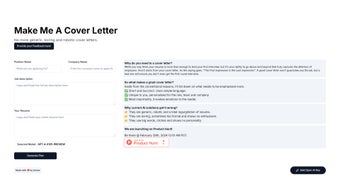
Getting Started: After loading the homepage, you’ll see a clean dashboard with three primary fields: (1) Job posting text, (2) Brief career summary, and (3) Desired tone (e.g., formal, friendly, innovative). Fill these sections, hit “Generate,” and the AI begins its analysis. The resulting cover letter appears in an editable text box. Use the built‑in “Refine” button to request alternative phrasing or a different emphasis. Once satisfied, click “Download PDF” or copy the content directly.
Compatibility (itemprop="operatingSystem"):
- Windows 10/11 (any modern browser)
- macOS Monterey and later (Safari, Chrome, Firefox)
- Linux distributions with up‑to‑date browsers
- Android 8.0+ (Chrome, Firefox)
- iOS 13+ (Safari, Chrome)
Because the service runs entirely online, you can switch between devices mid‑process – start on your laptop, finish on your phone, and still retain the same session (as long as you keep the browser tab open). The platform also respects accessibility standards, offering high‑contrast mode and screen‑reader compatibility.
Updates & Support: New language models are rolled out quarterly, ensuring the AI stays current with hiring trends and industry terminology. Users on the free tier receive automatic updates without any action required. For premium subscribers, a dedicated support portal provides priority email assistance and a knowledge base with step‑by‑step tutorials.
Pros, Cons, FAQ & Final Verdict
Pros
- Generates truly unique, human‑like cover letters.
- Fast, free basic version with no download required.
- Secure processing; no data is retained after the session.
- Works on all major operating systems and devices.
- One‑click PDF export simplifies application submission.
Cons
- Does not integrate directly with job boards or ATS platforms.
- Quality depends on the clarity of the user‑provided job description.
- Limited language options in the free tier (currently English‑only).
- Advanced styling features are locked behind the premium plan.
Frequently Asked Questions
Is Make Me A Cover Letter really free?
Yes, the core functionality – generating unlimited cover letters – is completely free. Premium features such as custom branding, bulk generation, and API access require a subscription.
Can I use the tool on my mobile phone?
Absolutely. The web app is responsive and works on Android and iOS browsers. You can generate, edit, and download letters directly from your phone.
How does the AI avoid sounding robotic?
The underlying model is trained on millions of real cover letters and uses sentiment analysis to inject genuine enthusiasm. It also applies a “style variation” algorithm that rewrites clichés and overused phrases.
Is my personal data safe?
All communication is encrypted via HTTPS. The platform does not store any personal information after the session ends, ensuring your data remains private.
Can I edit the generated letter before sending?
Yes, the output appears in an editable text box. You can make any changes, add a personal anecdote, or request the AI to re‑phrase specific sections.
Conclusion & Call to Action
Make Me A Cover Letter bridges the gap between the time‑consuming manual drafting process and the impersonal nature of generic templates. By leveraging AI to produce authentic, role‑specific letters, it empowers job seekers to showcase their individuality without sacrificing professionalism. The free tier provides ample value for most users, while the premium upgrade offers extra polish for those who need it. If you’re ready to transform your job applications and increase your interview odds, head over to the official site, generate your first cover letter, and experience the difference of a truly personalized approach.
Overall, Make Me A Cover Letter delivers a seamless, secure, and effective solution for crafting standout cover letters. Its AI engine produces natural-sounding text, and the platform’s cross‑device compatibility makes it accessible to anyone. While integration with job boards would be a welcome addition, the tool’s core strengths far outweigh this limitation.



.png)



